
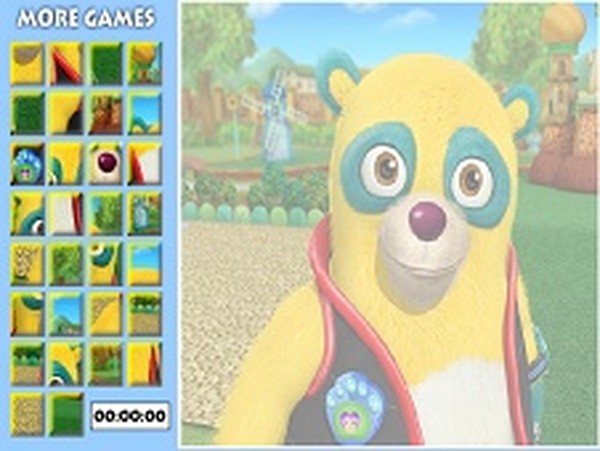
Oso Puzzle Challenge
Review
Oso Puzzle Challenge keeps its scope narrow and executes it cleanly. The transparent outline removes guesswork, and the timer adds just enough pressure to make repeated attempts feel worthwhile. Children can play independently, while adults may enjoy chasing faster times. The main limitation is variety: without a confirmed number of images, replay value depends on how many pictures the game includes. It works best as a short, low-stakes break rather than a long session.
Full story
Building the Picture Piece by Piece
The screen splits into two working areas. On one side, square puzzle pieces sit ready to be moved. On the other, a transparent outline shows the finished image waiting to be assembled. Each piece carries a distinct fragment of the picture, and the outline acts as a placement guide rather than a strict grid. Players use the mouse to click a piece, drag it across the screen, and release it over the matching spot. Correct placements snap into position, so there is no need to fine-tune alignment. The process repeats until every piece is placed and the image is complete.
How the Timer Shapes Play
A timer runs from the start of each attempt, turning a calm assembly task into a light race against the clock. The pressure is gentle rather than punishing: players can restart at any moment to try for a faster finish. This design encourages efficient scanning and decision-making. Instead of lingering on a single piece, players learn to identify obvious matches first and return to stubborn pieces later. The timer also gives the puzzle a clear measure of progress, which helps short sessions feel purposeful.
Who This Puzzle Suits
The content is family-friendly, with no violence or inappropriate themes, making it suitable for children and adults playing together. Because the drag-and-drop mechanic is simple, younger players can start without instruction. The game runs in a web browser without any downloads, so it works on shared computers and quick breaks. Sessions can be as short as a single puzzle or extended across several attempts, depending on how much time the player wants to invest.
Compatibility
FAQ
Reader Comments
Sign in to comment
You must be logged in before posting a review or rating.
No comments yet. Be the first to comment!



Editorial Notes