
Flip Gravity: Mind-Bending Platformer
Review
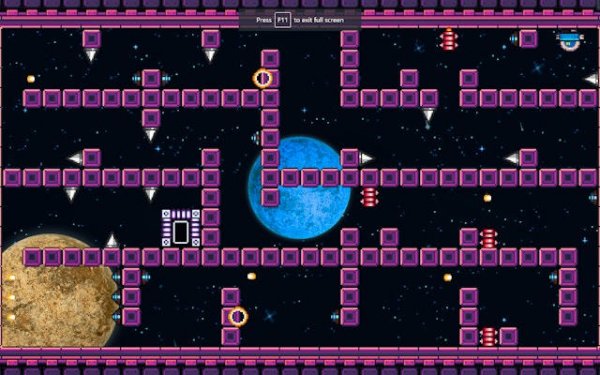
Flip Gravity keeps its scope tight: one gravity-flip action, compact puzzle-box stages, and a steady difficulty curve. The pixel-art clarity helps you read hazards at a glance, and short levels with auto-save suit quick sessions. Controls work on touch screens, mouse, and keyboard. It is best for players who enjoy spatial puzzles and short-burst platforming rather than long, story-driven campaigns.
Full story
The Gravity Flip as a Puzzle Tool
Every stage in Flip Gravity revolves around one transformative action: reversing gravity. A single tap attaches the character to the ceiling or a wall, flipping the environment upside down. This reshapes how you read each room. Spikes on the floor become harmless when you walk above them, and gaps in the ground turn into paths along the ceiling. The real challenge is not just moving left to right but deciding which surface to stand on at any given moment.
Compact Stages, Steady Difficulty
Levels are designed as compact puzzle boxes that can be completed in a few minutes. Early stages introduce the gravity flip in safe settings, letting you experiment without pressure. Later stages layer in moving traps, timed platforms, and narrow passages that demand quick thinking. The difficulty curve stays steady: you never feel overwhelmed, but you always feel pushed to improve. The pixel-art visuals keep the layout clear, so you can read each room at a glance.
Visual Clarity and Immediate Feedback
The pixel-art aesthetic is clean and functional. Each tile and hazard is distinct, making it easy to separate safe zones from dangerous ones. Contrasting tones highlight interactive elements, and animations are smooth and responsive, giving immediate feedback when you flip gravity or land on a surface. This visual clarity reduces frustration and keeps the focus on problem-solving rather than guesswork.
Short Sessions, Flexible Controls
Because levels are short, Flip Gravity suits quick gaming sessions during a break or commute. An auto-save feature tracks your progress, so you can stop and resume without losing your place. The controls are optimized for touch screens, but they also work well with a mouse or keyboard. That flexibility makes the game accessible on phones, tablets, and computers.
Building Spatial Awareness
Success depends on understanding how the character moves in a flipped world. You need to anticipate where you will land after a gravity change and how that affects your next move. The puzzles encourage you to think in three dimensions, even though the game is side-scrolling. Over time, you develop a mental map of each stage and learn to chain flips together for efficient routes. This mental exercise is rewarding and keeps the gameplay engaging.
Compatibility
FAQ
Reader Comments
Sign in to comment
You must be logged in before posting a review or rating.
No comments yet. Be the first to comment!


Editorial Notes