
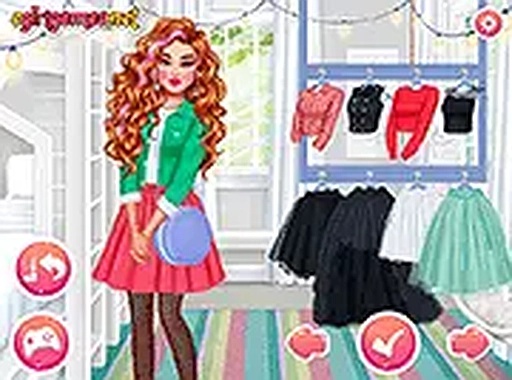
Fabric Fantasy Fashion Studio
Review
Fabric Fantasy Fashion Studio targets players who want quick, low-pressure styling without downloads or accounts. Its strengths are the drag-and-drop interface, per-item rotation and resizing, and independent color sliders for accessories. The community gallery adds inspiration without forcing social interaction. The limitation is depth: there is no scoring, competition, or progression system described, so players seeking goals beyond outfit creation may find it shallow. It suits casual and family audiences who enjoy experimentation.
Full story
Building an Outfit
Fabric Fantasy Fashion Studio starts with a base character. From there, the core loop is assembling a full look by layering garment pieces: tops, skirts, outerwear, and accessories. The interface supports drag-and-drop placement, so trying a combination takes seconds rather than navigating menus. Each piece can be rotated or resized to fit the character, which gives you control over silhouette and proportion. The system rewards experimentation because certain items interact visually, producing new textures or patterns when worn together. That interaction is the main reason to keep swapping pieces instead of settling on the first match.
Color Tools and Accessory Customization
A color adjustment tool lets you modify the shade of nearly every clothing item. The palette spans soft pastels to vibrant tones, so a single outfit can move between subtle monochrome and bold contrast. Accessories such as headwear, jewelry, and footwear have independent color sliders, meaning you can coordinate or deliberately clash them with the main garments. Favorite color combinations can be saved for later, which cuts down the work of recreating a look you already like. No artistic skill is needed; the sliders do the work.
Visual Style and Feedback
Garments are rendered with visible fabric textures, giving each piece a tactile quality that makes styling decisions feel material rather than flat. Backgrounds stay simple to keep attention on the character, though a few optional scenes are available for screenshots. Animations are minimal but smooth, with characters making subtle pose adjustments when outfits change. That small feedback loop helps you judge how a piece sits on the body before committing to it.
Sharing and Community Gallery
Completed outfits can be captured as screenshots and saved to your device or shared through social platforms. A community gallery lets you browse looks created by other players for inspiration. The gallery is optional and does not require an account, keeping access low-barrier for quick sessions. Moderation keeps shared content family-friendly.
Platform and Performance
The game runs in standard web browsers on desktop and mobile without downloads. Touch controls are supported on tablets and phones, with on-screen buttons replacing keyboard shortcuts. Loading times are short, and performance stays consistent even on older devices. Full-screen mode helps when fine-tuning small details like accessory placement. Progress saves locally, so unfinished outfits can be revisited later.
Compatibility
FAQ
Reader Comments
Sign in to comment
You must be logged in before posting a review or rating.
No comments yet. Be the first to comment!


Editorial Notes