
Vehicle Hue Organization Challenge
Review
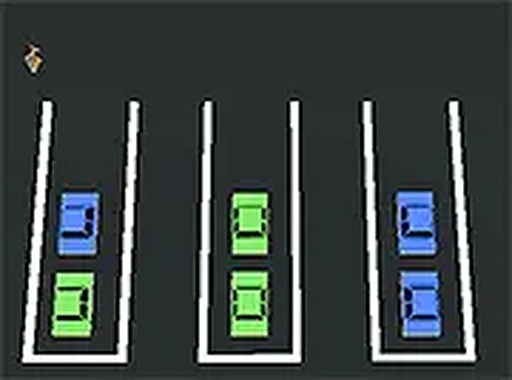
Vehicle Hue Organization Challenge strips puzzle design down to one clear rule: match each vehicle to a lane of its own color. The absence of a timer makes it a low-stress logic exercise, while limited spaces ensure that careless moves have consequences. Difficulty rises by adding lanes and hues, not by adding pressure. The clean visuals and desktop click-and-drag controls suit players who enjoy methodical sorting. It is best for those who prefer thinking puzzles over reaction-based challenges.
Full story
The Sorting Rule That Drives Everything
Every puzzle in Vehicle Hue Organization Challenge presents the same fundamental task: rearrange vehicles until each parking lane holds only one color. That single rule generates the entire challenge. Because available spaces are limited, you cannot move vehicles freely. Each placement either opens up future moves or blocks them. The game removes time pressure entirely, so the difficulty comes from planning, not from reacting quickly.
How Difficulty Ramps Up
Early puzzles use only a few colors and lanes, which lets you learn the sorting logic without much risk. As you progress, additional lanes and new hues appear. The board grows more crowded, and the sequence of moves required to solve it becomes longer. Because each puzzle has a unique arrangement, you cannot rely on memorized solutions. You have to read the board and adapt your approach every time.
Reading the Board and Planning Ahead
Success depends on thinking several moves ahead. Clearing one lane completely often frees the space needed to reorganize another. Spotting patterns in how vehicles are clustered helps you identify efficient sequences. Since there is no countdown, you can experiment with different orders and undo mistakes by simply trying again. Regular play trains you to recognize optimal moves faster.
Visual Clarity and Browser Access
The graphics are clean and each vehicle color is clearly distinguished, which makes it easy to assess the board at a glance. The game runs directly in a web browser with no downloads or registration. A full-screen mode is available for a more focused view. Controls are simple click-and-drag, designed for desktop use.
Compatibility
FAQ
Reader Comments
Sign in to comment
You must be logged in before posting a review or rating.
No comments yet. Be the first to comment!




Editorial Notes